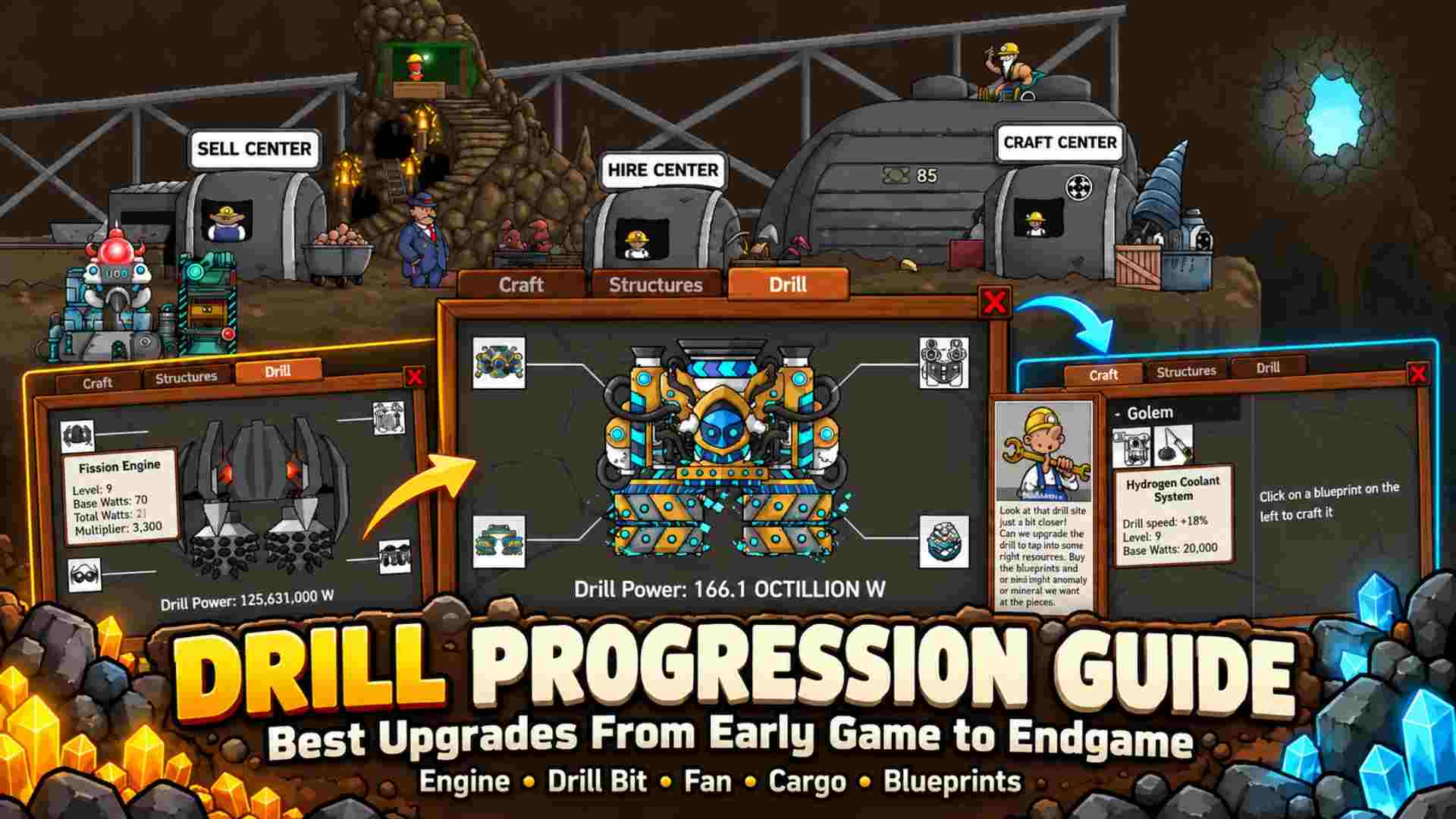
Your drill has slowed to a crawl. You have some cash, a pile of ore, and three new parts in the Craft Center. Which one should you buy? This Mr. Mine drill progression guide will help you choose the right upgrades, save resources, and dig deeper without wasting time.
A stronger engine can give your drill a big boost. However, a cheaper fan or drill bit might be enough to reach your next depth goal. And if your miners aren’t earning enough cash, even a faster drill won’t solve every problem.
This drill progression guide covers the real parts in Mr. Mine, from your first Steam Engine to the stronger gear found deep below Earth. You’ll learn what to buy, what to save, and when to skip a tier.
New to the game? The Mr. Mine beginner’s guide explains how shafts, miners, and depth work.
How Drill Upgrades Work in Mr. Mine
Mr. Mine does not give you a set of handheld drills to equip. You build one large drill and change its parts as you play. Each new kilometer opens a shaft where you can put miners to work.
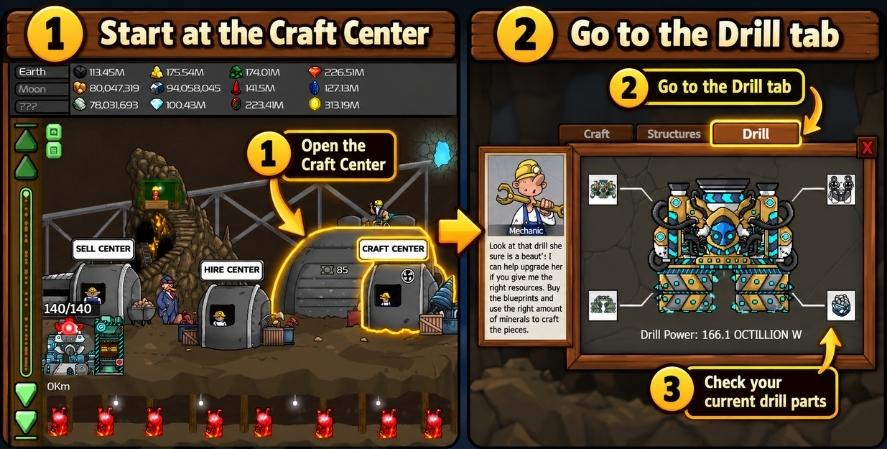
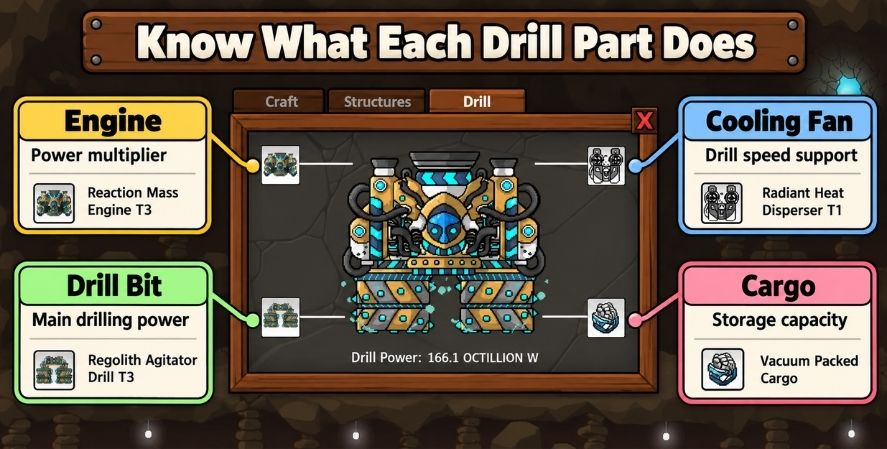
The drill has four parts. Three help you dig. The fourth gives you more room to store ore.
| Part | What it changes | When it helps most |
|---|---|---|
| Engine | Adds power and boosts the total watts | When the next engine gives a big jump in speed |
| Drill Bit | Adds base watts | When a new bit costs less than other ways to gain power |
| Cooling Fan | Adds base watts | When its power gain is worth the ore and cash |
| Cargo Hold | Raises ore storage space | When your storage fills before you can sell |
There’s no fuel gauge to manage here. The question is how to get more drill power without wasting the ore you need for your next part.
Watts Tell You How Fast You Can Dig
Mr. Mine shows drill power in watts. More watts cut the time it takes to reach the next shaft. That matters more as the rock gets harder at lower depths.
Your drill bit and fan add power. The engine adds some power too, then boosts the total with a multiplier.
Total drill watts = (engine base watts + bit watts + fan watts) × engine multiplier
Here’s a small example using real early parts:
- A 2 Cylinder Engine has 5 base watts and a 2× boost.
- A Copper Drill adds 5 watts.
- A Double Fan adds 5 watts.
That gives you (5 + 5 + 5) × 2 = 30 watts.
Now swap in a 4 Cylinder Engine. It has 10 base watts and a 4× boost. With the same bit and fan, your total rises to 80 watts.
That is a big leap from one part. Still, don’t buy an engine by habit. Check what a better bit or fan would cost before you use up your ore.
Drill Progression Chart: Early Game to Late Game
This drill progression guide groups the main parts by stage, so you can see what to check next. These are real part names from Mr. Mine, but they are not a fixed shopping list. You may find a better blueprint before you buy the part below it.
| Where you are | Parts worth checking | What to do |
|---|---|---|
| Start of Earth | Junk Engine, Tiny Drill, Basic Fan | Learn the Craft Center and build some cash |
| Early Earth | Steam Engine, Copper Drill, Double Fan | Buy cheap power boosts |
| Deeper on Earth | 2–6 Cylinder Engines, Silver or Platinum Drill, Quad Fan | Match drill power with miner income |
| 50 km: Golem | Basic Nuclear Engine, Barbaric Drill, Heat Pump | Check stronger blueprints and save rare ore |
| 225 km: Broken Robot | Drill King Engine, Drill Smasher, Bihydrogen Coolant System | Plan costly upgrades before crafting |
| Moon and later worlds | Lunar Rocket engines and later world-specific parts | Use new materials and look for tier skips |
You won’t need every part in each row. In fact, skipping a low tier can save a lot of cash. The trick is knowing when to wait and when to buy what’s in front of you.
For the full list of parts and their costs, see the Mr. Mine drill blueprints guide. Game updates may change what you see, so treat the Craft Center as the final check.
Best Early-Game Drill Progression
At the start, you don’t have much cash. But early parts are cheap enough that a few smart buys can make the mine feel much faster.
Start With Cheap Power
Open the Craft Center and check your next parts. The first names to look for are the Steam Engine, Copper Drill, and Double Fan.
The published blueprint list gives these cash costs:
| Early part | Listed cash cost | Why it helps |
|---|---|---|
| Steam Engine | $150 | An easy first engine step |
| Copper Drill | $250 | More power from the drill bit |
| Double Fan | $700 | A boost from the cooling slot |
Some later crafts also need ore, not just cash. Check the full recipe before you sell minerals.
For early upgrades, use this drill progression guide as a starting point, not a fixed order. Choose the part that cuts the wait for your next shaft at a price you can pay. You don’t need to clear each slot in order.
Move to Cylinder Engines and Better Bits
After the first cheap parts, look at the 2 Cylinder Engine and Silver Drill. Later, the 4 Cylinder Engine, Platinum Drill, and Quad Fan can help you keep moving.
The 6 Cylinder Engine is a strong Earth goal because its multiplier is much larger than the first engines. Yet it also needs more resources. If you’re still saving for it, a cheaper bit or fan may be a good short-term buy.
Try this check before each craft: note how long the next kilometer will take. Buy the part, then look at the new time. This tells you what your ore paid for.
Don’t Leave Your Miners Behind
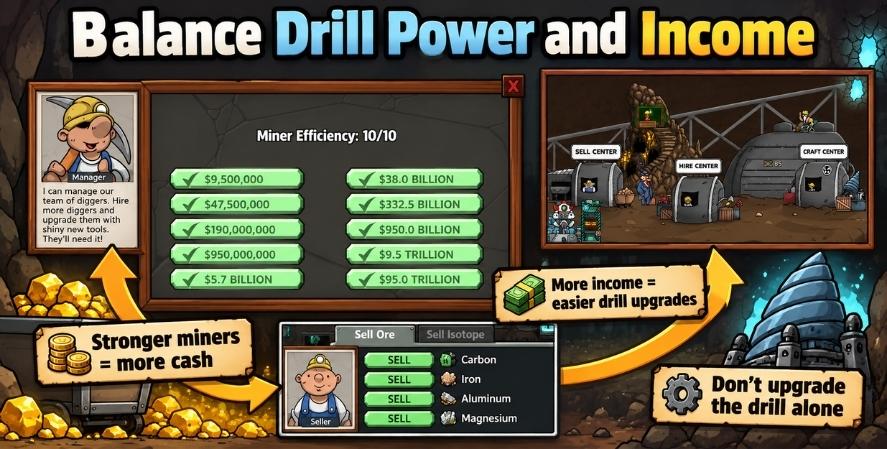
Your drill finds new shafts. Your miners earn the ore and cash that pay for more parts. If you spend everything on speed, your income may not keep up.
Put money into miners when parts start to feel out of reach. Also, save any ore you need for the next craft. Selling a full stack feels good until the same ore shows up in a new recipe.
The minerals and isotopes guide can help you work out what to keep.
Mid-Game: What Changes at 50 km?
At 50 km, you can find the Golem. This opens a new group of drill parts. It’s one of the first big turns in your upgrade path.
You may see parts such as the Basic Nuclear Engine, Barbaric Drill, and Heat Pump in this stage. They offer more power, but their costs can be steep.
You don’t need to craft a full matching set. Maybe you have enough ore for the new engine but are far short of the drill bit. Take the useful boost now, then work on the next part.
Check Blueprints Before You Spend
Blueprints come from more than one place. The Craft Center and special vendors are key sources. You can also find some higher-tier plans in treasure chests or through trades.
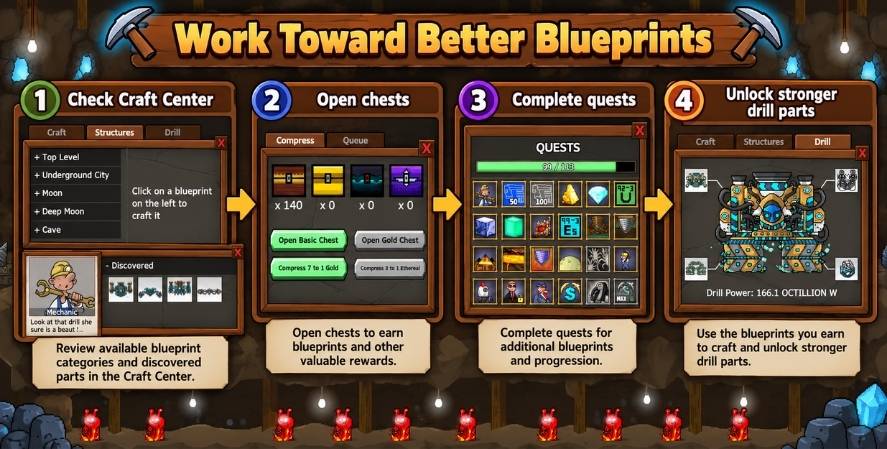
Note: Drill blueprints can be obtained through sources such as Gold Chests and special trades. Quests offer progression rewards but do not always provide drill blueprints. Check each reward and crafting requirement in the game.
Here’s the part many players miss: a new drill part replaces the old part in that slot. The two do not stack. If you can craft a stronger bit, you may be able to pass over an earlier one.
But a blueprint is not a free part. You still need the cash and items shown in its recipe. A trade can give you a plan long before you can afford to craft it.
If you use the Trading Post, check the cost of both the deal and the craft. Our Trading Post guide covers how those deals work.
When Should You Skip a Drill Tier?
A drill progression guide can show you the common upgrade path, but the best choice depends on the blueprints you own. Let’s say you have two fan plans. You can craft the cheaper one today, but you are close to the next fan and already have most of its ore.
Waiting may be the better choice. You’ll save the cost of a part that you would soon replace.
Now change the situation. The stronger fan needs a rare item you can’t get yet, and your drill has slowed down. The cheaper fan may help you reach that item sooner.
So don’t skip parts just to skip them. Skip when the next tier is within reach. Buy now when the boost helps you reach it.
Late-Game Drill Progression: 225 km and Beyond
The Broken Robot at 225 km opens more high-level gear. Here you can find parts such as the Drill King Engine, Drill Smasher, and Bihydrogen Coolant System.
These upgrades ask for far more cash and materials than the early Earth parts. A bad purchase can leave you saving for a long time.
At this stage, use the drill progression guide to check three things before you buy: the watts you’ll gain, the materials you’ll have left, and whether more speed will help you reach something useful soon.
Pick the Upgrade That Fixes Your Slowdown
There are times when drill power is the clear answer. You have enough money, but the next shaft takes too long. A strong engine, bit, or fan can help.
Other times, the drill is fine and the rest of your mine needs work. Your shafts may not earn enough to pay for the next blueprint. In that case, invest in miners or make better use of your ore.
Don’t judge a part by its price. A cheaper upgrade that gets you to a key depth is often worth more than one big part that drains your stock.
What About the Moon and Titan?
Later worlds add their own parts and materials. The Moon brings Lunar Rocket Engine parts, new drill bits, and new cooling parts. Titan and the stages after it bring more gear.
The best choice will depend on the plans you’ve found and the items you can collect. You can sometimes jump over several low-level parts once a new world’s Craft Center opens.
You can compare the named part lines in the Mr. Mine Wiki blueprint list. Its tables may lag behind game updates, so check the live recipes before you spend rare materials.
Should You Upgrade the Engine, Fan, Bit, or Cargo?
A useful drill progression guide starts with one question: What’s stopping me right now? Choose a part that solves that problem instead of buying the most expensive one.
| Your problem | Try this |
|---|---|
| The next kilometer takes too long | Compare the engine, bit, and fan |
| Ore storage fills too soon | Look at cargo space and how you sell |
| You have too little cash for parts | Improve miners and mineral income |
| You need a rare item for a plan | Save that item and check new ways to get it |
| You found a much stronger blueprint | See whether you can skip a lower tier |
Engine: Big Gains, Higher Costs
Engines are often worth a close look because of their power boost. But that does not make every engine the best next buy. Check how much your total watts will rise for the full recipe cost.
Drill Bit and Fan: Don’t Ignore Them
Both parts add base watts. A new fan can beat a new bit, or the other way around. The answer changes with your current setup.
For that reason, it’s better to compare the parts you can craft than to follow a fixed order from a tier list.
Cargo: More Space, Not More Speed
Cargo raises your ore limit. It does not add drill watts. Upgrade it when storage gets in your way, such as when you come back to a full load after an idle run.
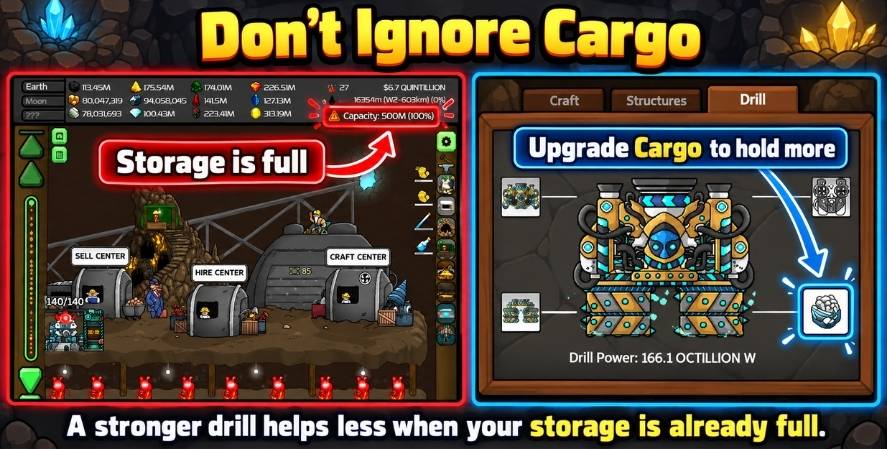
If storage is rarely full, save that cash for another part. More room has little value if you never use it.
How to Get Better Drill Parts Faster
You don’t have to watch the drill for hours to make progress. This drill progression guide gives you a short plan for getting parts without buying whatever lights up in the menu.
- Choose a depth goal. The Golem, Broken Robot, or a new world gives you something to aim for.
- Check the next craft. Note the cash, ore, and other items it needs.
- Keep those items. Don’t sell the minerals you’ve been saving for that part.
- Look for blueprints. Check new vendors, chests, and useful trades.
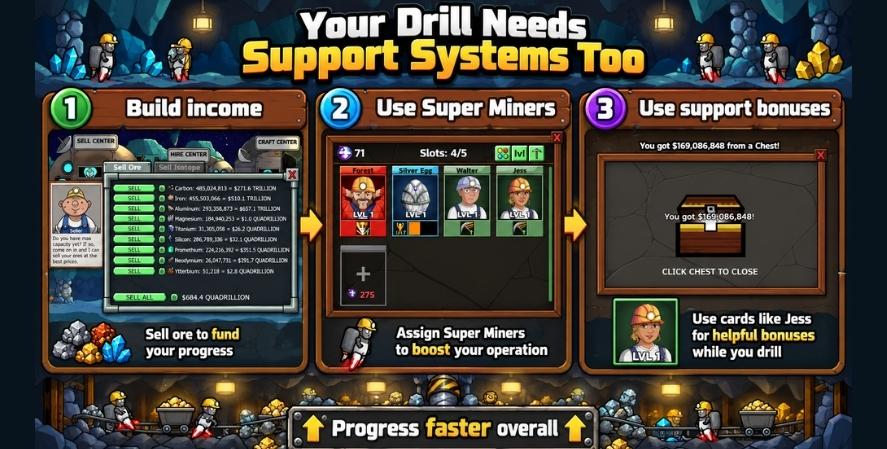
- Build income as you go. Better miners can shorten the wait for costly parts.
- Review your plan when you find a new blueprint. A good drop may change your next purchase.
If you have a Super Miner that boosts drill speed, use that bonus when it helps your goal. Some give other types of boosts instead. See our Super Miners guide for their roles.
Five Drill Mistakes That Can Slow You Down
Buying every part in order. You don’t always need the part between your current one and the next big upgrade. Check your other blueprints first.
Putting all your money into the engine. A better fan or bit might give more watts for less. Look at all three power slots.
Buying cargo to speed up the drill. It won’t. Cargo is for storage. Use it when full ore space is the real problem.
Selling ore you need for a craft. Before you sell a large haul, read your next recipe. Save the hard-to-find items first.
Pushing deeper while your income falls behind. New shafts are great, but they still need miners. Keep your mine earning enough to pay for new gear.
Frequently Asked Questions
What is the best first drill upgrade in Mr. Mine?
The Steam Engine, Copper Drill, and Double Fan are good early parts to check. Start with the one that gives you a useful boost at a cost you can afford.
Should I upgrade my engine or drill bit first?
Compare the power gain and the full cost of each part. Engines can give large boosts, but a cheaper bit may offer better value with your current setup.
Does a better cooling fan make the drill faster?
Yes. The fan adds base watts, so a better fan can help you reach new depths sooner.
Does cargo increase drill power?
No. Cargo gives you more ore storage. It is useful when storage fills up, not when you need more watts.
How do I unlock better drill blueprints?
You can get plans from the Craft Center, special vendors at key depths, some chests, and trades. Check what is open in your game.
Can I skip drill upgrades?
Yes. A higher-level part can replace a lower-level part, as long as you have its blueprint and can pay the craft cost.
What is the best mid-game drill?
There isn’t one full drill set that everyone must buy. At 50 km, check the Golem’s parts. Choose the engine, bit, or fan that helps your mine most.
What is the best endgame drill?
The answer depends on your world, blueprints, and resources. The strongest part on paper may not be the one you can craft now. Aim for a useful gain at a cost that leaves you able to keep growing.
Final Tip: Buy for the Next Goal, Not the Biggest Number
A faster drill feels great, but a good upgrade is one that helps your next move. Treat this drill progression guide as a way to plan that next purchase, not a list of parts you must buy in order.
Early on, take the cheap gains from parts like the Steam Engine and Copper Drill. As you reach the Golem and Broken Robot, think more about cost, ore, and the depth you want to reach. Later, watch for blueprints that let you skip a tier.
Before your next craft, open the drill menu and compare all three power parts. If storage is full, check cargo too. A minute spent on that choice can save a long grind later. You can also play Mr. Mine on its official site.