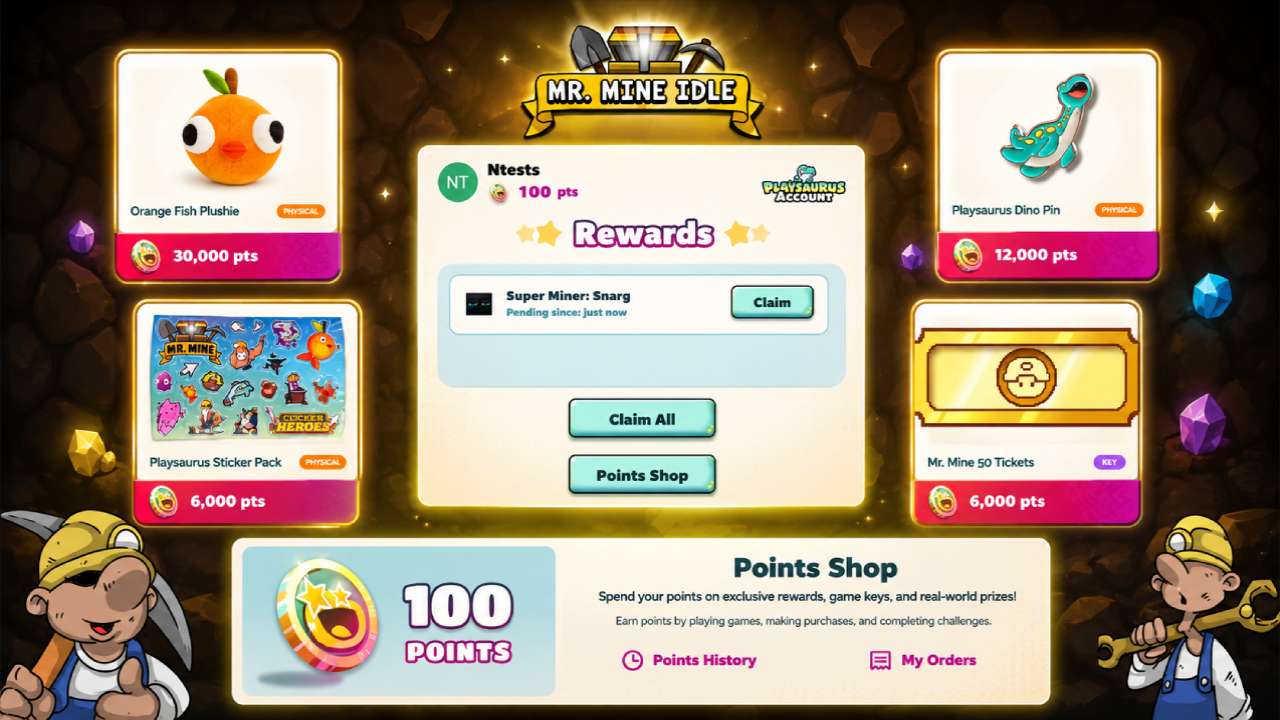
The Playsaurus Points program rewards players for completing quests and participating in official Playsaurus activities.
By joining community servers, following social media accounts, watching trailers, wishlisting upcoming idle clicker games, and completing other eligible tasks, you can earn Playsaurus points that can be exchanged for exclusive rewards.
Once you’ve collected enough points, you can visit the Playsaurus Points Shop to explore the rewards available and choose what you want to redeem, including a special reward for Mr. Mine.
In this points redemption guide, we’ll explain how to earn points, how the reward points exchange process works, the different types of Mr Mine rewards available, and how to redeem your points efficiently so you can get the most value from the program.
What Is the Mr. Mine Points Redemption Program?
Before you start redeeming rewards, it helps to understand how the Playsaurus Points system works and what benefits it offers to Mr. Mine players.
Understanding Playsaurus Points
Playsaurus Points are a universal rewards currency used across eligible Playsaurus games and activities.
You can earn them by completing qualifying quests, participating in community events, and other supported activities outlined by Playsaurus.
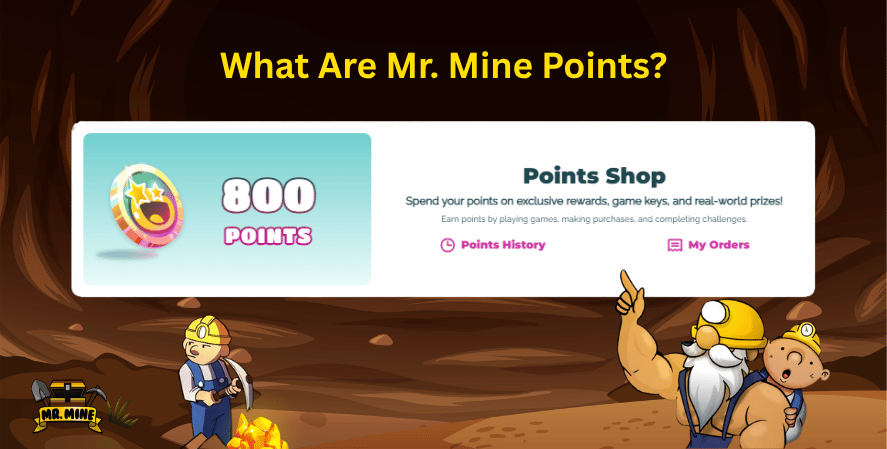
Once you’ve accumulated enough points, you can browse the Playsaurus Points Rewards Catalog and redeem them for available rewards.
Everything is linked to your Playsaurus account, making it easy to track your balance and claim rewards across supported titles.
Anyone with a Playsaurus account can participate in the program, provided they meet the eligibility requirements for earning and redeeming points.
Benefits of Redeeming Points
The biggest advantage of the program is that it gives players meaningful rewards for staying active in the game community.
Depending on what’s currently available in the catalog, you can redeem your points for exclusive Mr. Mine rewards, such as:
- Super Miners
- Tickets
- And other in-game items
The shop also features Steam game keys, allowing you to expand your game library, along with official video game merchandise like pins, plushies, and sticker packs.
Because the catalog is updated over time, players can also look forward to featured rewards, seasonal promotions, and other limited-time redemption opportunities. This makes it worthwhile to save points and check the shop regularly.
How to Earn Playsaurus Points
The Playsaurus Points program is quest-based. Completing eligible quests rewards you with points that can later be redeemed in the Playsaurus Points Shop.
Current Ways to Earn Playsaurus Points
Currently, you can earn Playsaurus Points by completing a variety of official quests available in the Points portal.
These activities include:
- Joining the Mr. Mine Discord server (150 Points)
- Joining the Clicker Heroes Discord server (150 Points)
- Following Playsaurus on Instagram (50 Points)
- Following Playsaurus on X (50 Points)
- Watching trailers for upcoming best clicker games like Clicker Heroes Reborn and Orc Incremental (100 Points)
- Wishlisting eligible Playsaurus games on Steam, including Desktop Detective and Orc Incremental (150 Points)
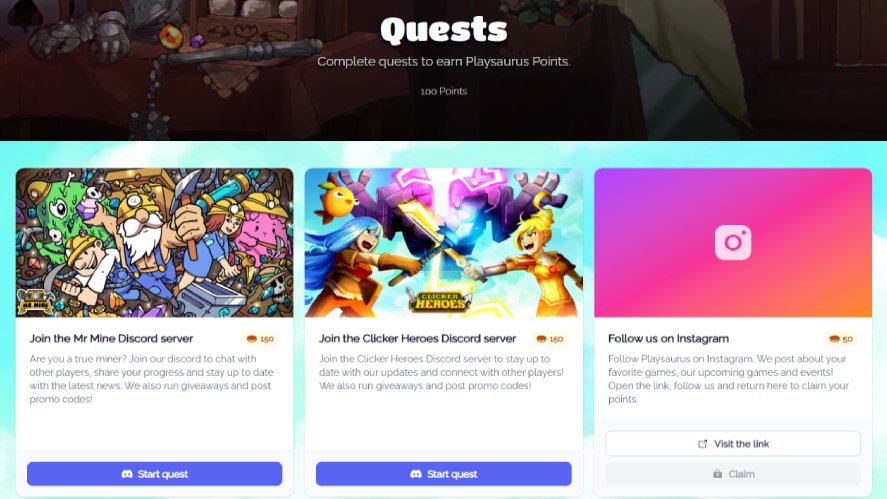
Each quest awards a fixed number of points once you’ve completed the required action and claimed the reward.
Future Quests and Promotions
The quest system will continue to evolve over time. New activities, seasonal campaigns, game launches, community events, and other promotions may be added to give players more opportunities to earn points.
Therefore, checking the Playsaurus Points portal regularly is the best way to stay up to date with newly available quests and limited-time earning opportunities.
How to Redeem Playsaurus Points
Redeeming your Mr Mine Points only takes a few minutes. Once you’ve earned enough Playsaurus Points, follow these steps to claim your rewards.
Create or Sign In to Your Playsaurus Account
The Playsaurus Points system requires a Playsaurus account.
If you don’t already have one, launch Mr. Mine and click the Account button in the bottom-left corner of the Main Menu.
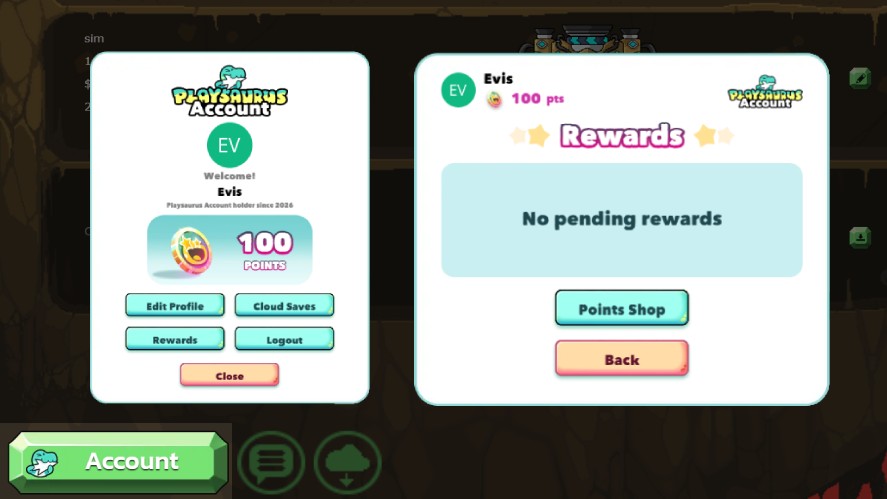
Follow the prompts to create your account and verify it using the registered email. If you already have a Playsaurus account, simply sign in.
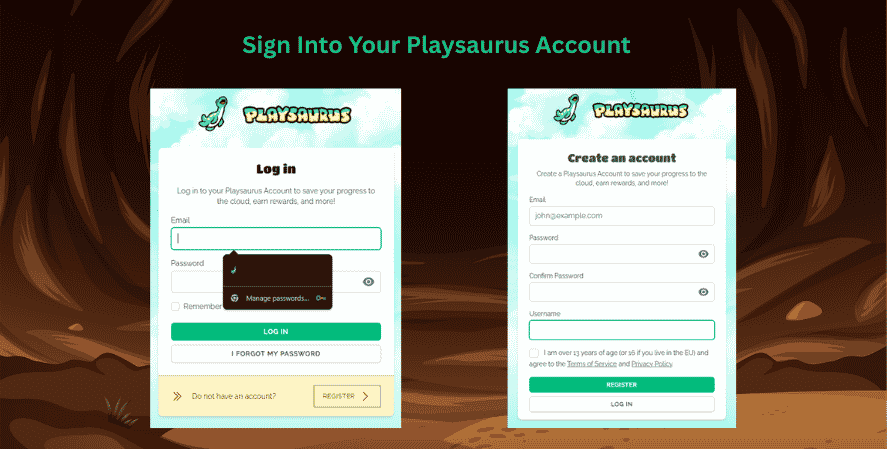
Your Points balance, reward history, and redeemed items are all linked to this account, so be sure to use the same account throughout the entire redemption process.
Open the Playsaurus Points Shop
After signing in, you can access the Playsaurus Points Shop in three ways:
- From the Main Menu, select Account → Rewards → Points Shop.
- While playing, open the Garage, click Rewards, and then select Points Shop.
- Lastly, you can use the Playsaurus Points Shop to access the shop directly in your browser.
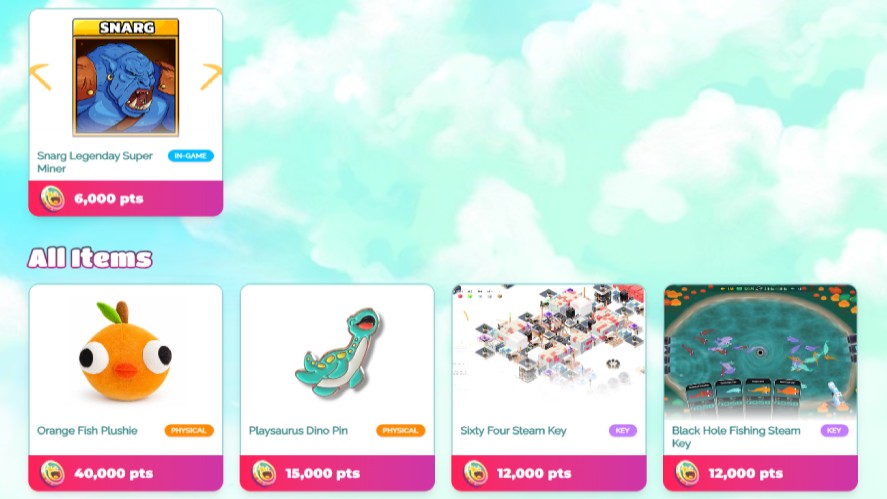
The game will automatically open the official Points Shop in your web browser. If asked, sign in again using the same Playsaurus account you use in Mr. Mine.
Choose and Redeem a Reward
Once you’re logged in, you’ll see the current available rewards. Browse the list and select the reward you’d like to claim.
Each reward displays its Point cost and details. Once you’ve made your choice, confirm the redemption request. Your Points will be reserved, and the request will be submitted for review.
Wait for Approval
Every redemption request is reviewed by the Playsaurus team before it can be claimed.
During this stage, your reward will appear as pending. Approval times may vary, so you’ll need to wait until the request has been approved before returning to the game.
Claim Your Reward
After your reward has been approved, launch Mr. Mine and sign in using the same Playsaurus account.
When you load one of your save files, a reward popup will appear, allowing you to claim the item immediately.
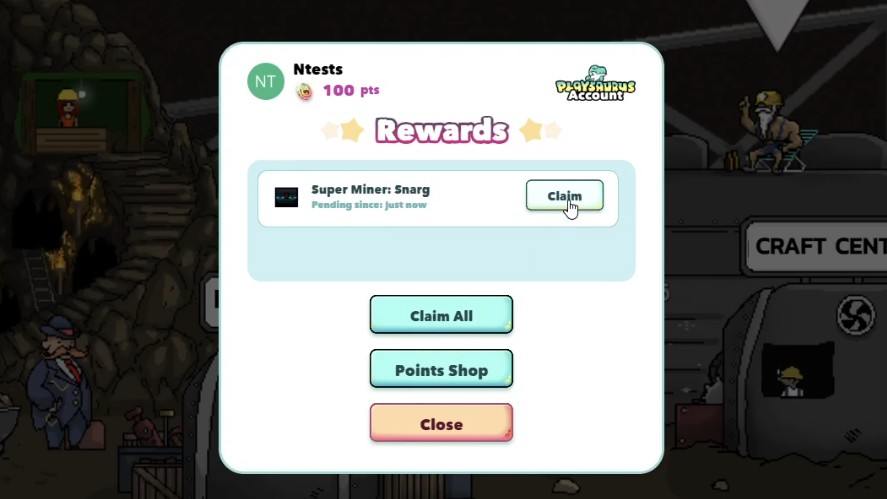
If you prefer to claim it later, simply close the popup and return to Account → Rewards from the Main Menu or Rewards in the Garage whenever you’re ready.
Digital rewards are added directly to your account after being claimed.
Physical merchandise enters the fulfillment process after approval, while Steam game rewards provide an activation key that can be redeemed through Steam to add the game to your library.
Best Rewards to Redeem Using Points Redemption Guide
The best way to spend your Playsaurus Points depends on what you value most.
Some players prioritize items that improve their Mr. Mine progression, while others prefer expanding their game library or collecting exclusive merchandise.
Exclusive Mr. Mine Items
If you’re an active Mr. Mine player, in-game rewards usually provide the best value. Items such as Super Miners, Tickets, Building Materials, Timelapses, and Gold Chests can help accelerate your gameplay progress without spending premium currency.
These rewards are delivered directly to your Playsaurus account after your redemption has been approved, making them an excellent choice for players who want to strengthen their mining operation.
Steam Game Keys
The Playsaurus Points Shop also lets you redeem points for Steam game keys.
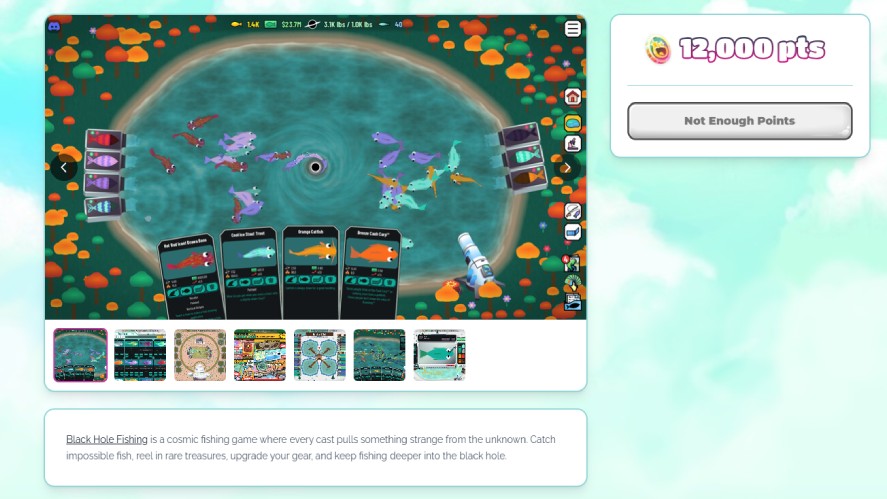
These rewards allow you to add new games to your Steam library at no additional cost. After your redemption request has been approved, you’ll receive a Steam activation key that can be redeemed through Steam.
If you’re interested in discovering new games from Playsaurus, game keys often provide some of the best long-term value in the catalog.
Playsaurus Game Rewards
In addition to Mr. Mine Rewards, the shop includes rewards for other Playsaurus titles as the program expands.
Depending on the current list, you may find game-specific items, premium currencies, or other digital content that can be claimed using your Points.
If you play multiple Playsaurus games, these rewards are worth checking before spending your balance.
Physical Merchandise
For players who enjoy collecting gaming memorabilia, the shop also offers official video game merchandise.
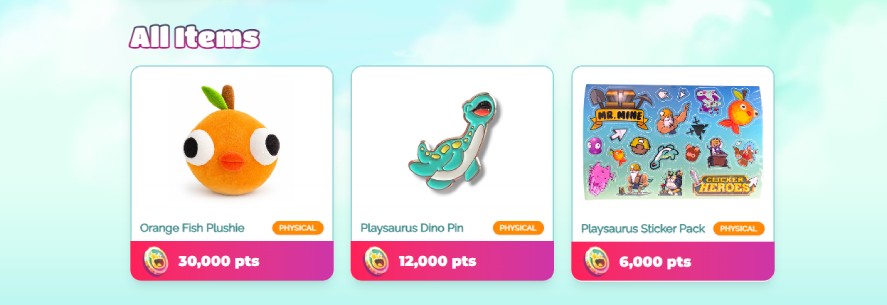
Available items may include plushies, enamel pins, sticker packs, apparel, posters, and other collectible merchandise. Because quantities may be limited, these rewards can sell out or rotate out of the catalog over time.
Featured & Limited-Time Rewards
Some of the most exciting rewards only appear for a limited time.
Featured rewards may include exclusive merchandise, seasonal collectibles, special game bundles, or promotional offers that aren’t always available.
Since the catalog is updated regularly, checking the shop often gives you the best chance of redeeming these exclusive items before they’re gone.
Tips to Maximize Your Points
Earning Playsaurus Points takes time, so spending them wisely ensures you get the greatest value from every redemption.
Complete Every Available Quest
Even small quests add up over time. Completing every available quest is the fastest way to build your Points balance and unlock higher-value rewards sooner.
Save Points for Exclusive Rewards
It can be tempting to redeem your Points as soon as possible, but saving for larger rewards often provides better value.
Exclusive merchandise, premium in-game items, and Steam game keys are usually worth the extra patience.
Check the Shop Frequently
The Playsaurus Points Shop is updated with new rewards and promotions over time.
Visiting the shop regularly helps you discover newly added items before you spend your Points elsewhere.
Watch for Limited-Time Offers
Some rewards are only available during seasonal events or special promotions.
If you see a reward you really want, consider redeeming it before the offer expires or inventory runs out.
Compare Rewards Before Redeeming
Before confirming your redemption, compare the available options and their Point costs.
Depending on your game strategy and goals, you may get more value from saving for a premium reward rather than spending your Points on several smaller items. Planning ahead helps you make the most of every Point you earn.
Things to Know Before Redeeming
Before you spend your Playsaurus Points, it’s worth understanding a few important details about how the redemption system works.
Keeping these in mind can help you avoid surprises and make the most of your Points.
Reward Availability
The rewards available in the Playsaurus Points Shop can change over time. New items may be added, while others may be removed or offered only for a limited period.
If you’re interested in a specific reward, it’s a good idea to redeem it while it’s still available.
Regional Restrictions
Some rewards may have regional limitations.
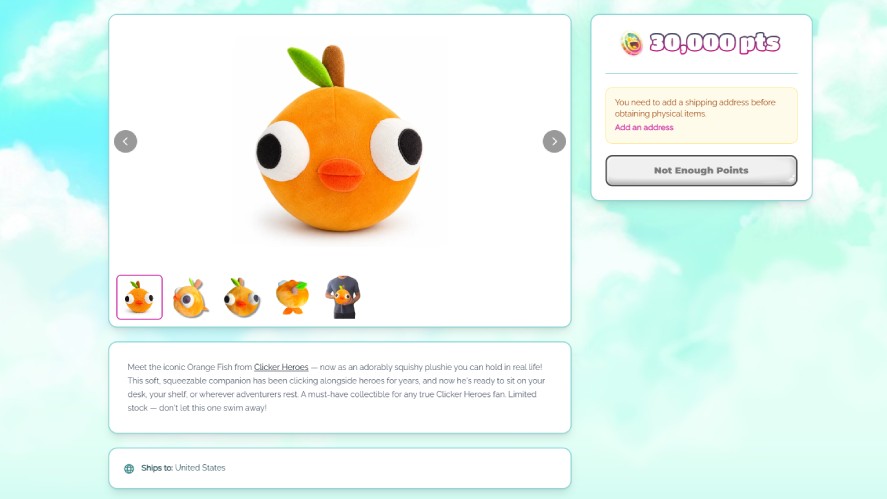
Physical merchandise, for example, may only be available in supported shipping destinations, while certain digital rewards could have region-specific requirements.
So, always review the reward details before redeeming your Points.
Account Eligibility
You’ll need a valid Playsaurus account to earn and redeem Playsaurus Points.
Make sure you’re signed in with the same account when accessing the Points Shop and claiming rewards in Mr. Mine, as rewards are linked directly to your account.
Points Redemption Guide Policies
Every redemption request is reviewed before the reward is issued. Once you’ve confirmed a redemption, it may not be possible to modify or cancel the request while it’s awaiting approval.
Processing times can also vary depending on the reward you’ve selected.
Terms and Conditions
The Playsaurus Points program may change as new features and rewards are introduced.
Before redeeming your Points, review the details on each reward page to understand its Point cost, eligibility requirements, delivery method, and any applicable restrictions.
Frequently Asked Questions About Points Redemption Guide
You can earn Playsaurus Points by completing eligible quests and activities available through the Playsaurus Points portal.
Sign in to your Playsaurus account, open the Playsaurus Points Shop from Mr. Mine, choose a reward, and confirm your redemption. Once it’s approved, you’ll be able to claim your reward.
Yes. Some physical merchandise and featured rewards are available in limited quantities and may no longer be redeemable once inventory has been claimed.
There is currently no information indicating that Playsaurus Points expire. Since the program is still evolving, keep an eye on official Playsaurus announcements and the Points Shop for any future updates.
Playsaurus Points are tied to your Playsaurus account and generally can’t be transferred to another account.
Not always. Shipping availability depends on the reward and your location, so check the reward details for any regional restrictions before redeeming.
Once a redemption request has been submitted, it may not be possible to cancel it. Be sure you’ve selected the correct reward before confirming your redemption.
Yes. The Playsaurus Points Rewards Catalog is expected to grow over time with new in-game rewards, merchandise, Steam game keys, and limited-time offers.
Conclusion
The Mr Mine Points redemption program makes it easy to turn your Playsaurus Points into valuable rewards.
From earning Points through official quests to redeeming them for in-game items, Steam game keys, and exclusive merchandise, the process is designed to reward active members of the Playsaurus community.
Because both the available quests and the Playsaurus Points Shop catalog continue to evolve, it’s worth checking back regularly for new earning opportunities and exclusive rewards.
Before redeeming your game points, take a moment to review the reward details in the Points Shop, including the Point cost, availability, and delivery method.
Since new quests and rewards are added over time, checking the shop regularly is the best way to stay up to date and make the most of your Playsaurus Points.
2 thoughts on “Mr. Mine Points Redemption Guide: Everything You Need to Know”