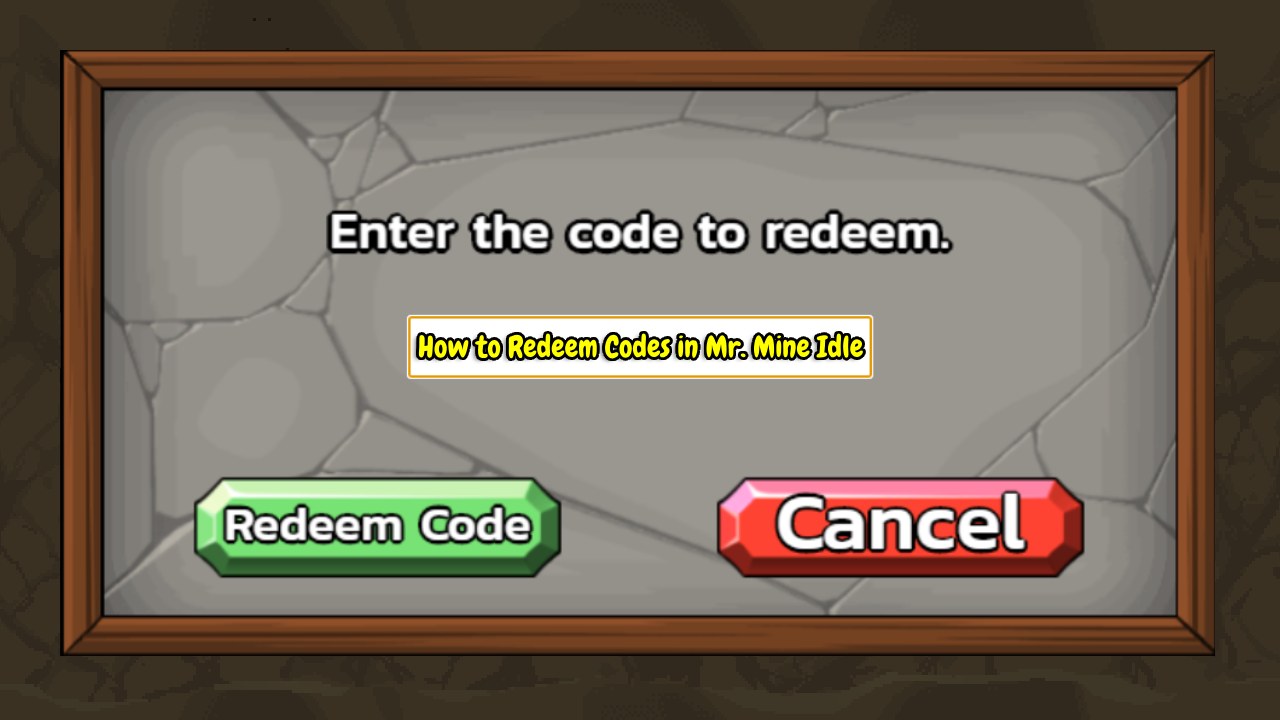
Mr. Mine occasionally releases redeem codes that can provide useful in-game rewards, including tickets, chests, buffs, and other bonuses.
Depending on how you receive a code, you may be able to redeem it in one of two ways: through a clickable redemption link with the code already included, or by entering the code manually in Mr. Mine.
This guide walks you through both methods, starting with the faster direct-link option. The exact redemption process can vary by platform, so we also cover the differences between Steam, Web, Android, and iOS.
The Two Ways to Redeem a Mr. Mine Code
There are two ways to redeem a Mr. Mine code, depending on whether you receive a redemption link or a standalone code.
| Method | Best Used When | What You Do |
|---|---|---|
| Direct Redemption Link | The code was shared as a clickable Mr. Mine URL | Open the link and follow the on-screen instructions |
| Manual In-game Redemption | You only have the code text | Open the Garage and enter the code |
Quick tip: If you received a link beginning with mrmine.com/redeem, try the direct-link method first. If you only received a series of letters and numbers, use the manual method.
Method 1: Redeem a Mr. Mine Code Using a Direct Link
A Mr. Mine redemption link is an official URL that already includes the code, so you do not have to type or search for the code yourself.
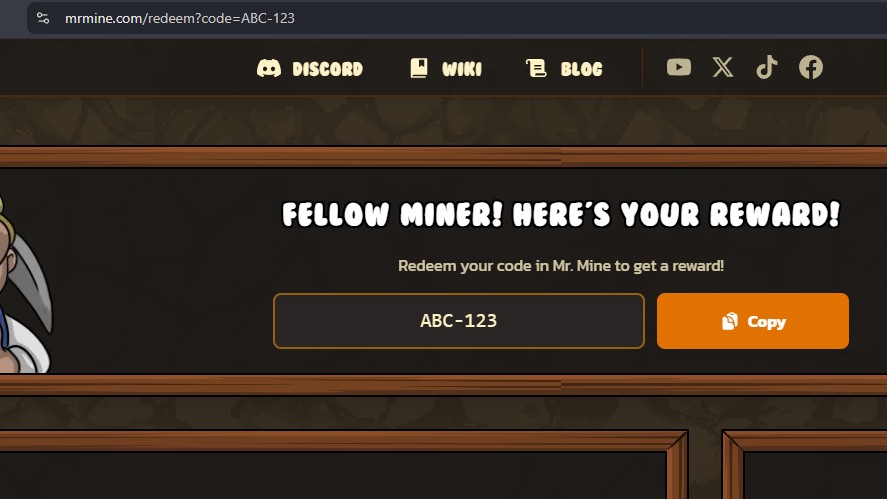
For example: https://mrmine.com/redeem?code=ABC-123
Here is how the URL is structured:
- https://mrmine.com/redeem — Opens the official Mr. Mine code redemption page.
- ?code= — Tells the page that a redemption code has been included in the URL.
- ABC-123 — The example code supplied to the page. It’s a tutorial placeholder, not a confirmed working code.
The code is carried into the redemption page automatically, so do not remove or change characters in a real link.
Step 1: Open the Redemption Link
Click the complete Mr. Mine redemption link you received, or paste it into your browser’s address bar.
Make sure you:
- Use the entire URL, including everything after ?code=.
- Check that the link uses the official mrmine.com domain.
- Never enter your password or account details on an unofficial code website.
Step 2: Confirm That the Code Was Detected
The redemption page displays a “Fellow miner! Here’s your reward!” message and shows the supplied code in the code field.
With the example URL above, the page displays ABC-123 automatically. A Copy button is also provided so you can copy the code without typing it manually.
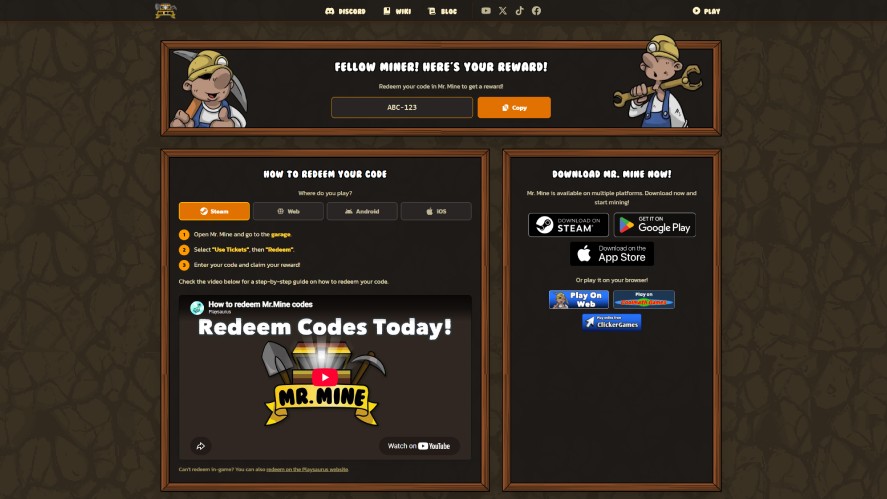
The page also asks “Where do you play?” and provides four platform options:
- Steam
- Web
- Android
- iOS
The first three use essentially the same in-game redemption process. iOS has a separate redemption flow because codes cannot be redeemed inside the iOS app.
Step 3: Choose or Open the Correct Game Version
Select the platform where you play Mr. Mine. The redemption instructions shown on the page change based on your selection.
Steam or Web
For the Steam and Web versions, the redemption page provides the same instructions:
- Open Mr. Mine and go to the Garage.
- Select “Use Tickets”, then “Redeem”.
- Enter the code and claim your reward.
To do so, simply copy the redemption code at the top of the page first. Then, follow the steps below:
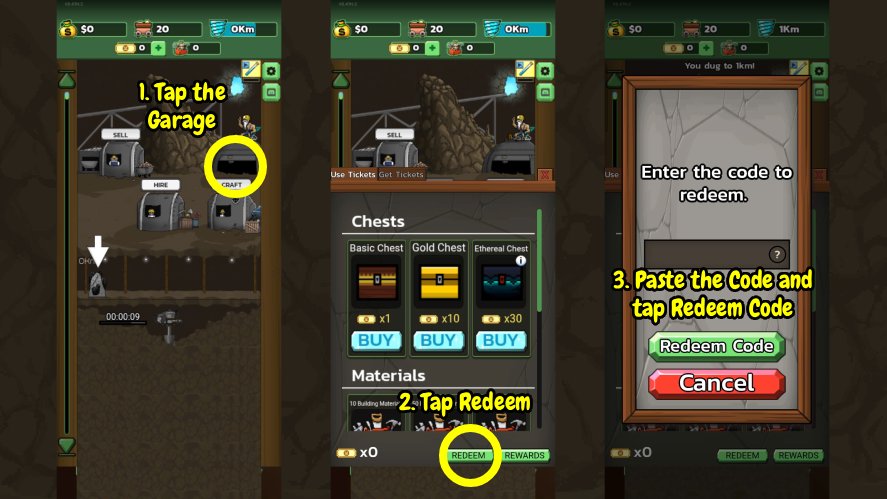
- Launch the Mr. Mine Idle mining game on your device.
- Click the Garage located right below the buff guy to open the Ticket Shop.
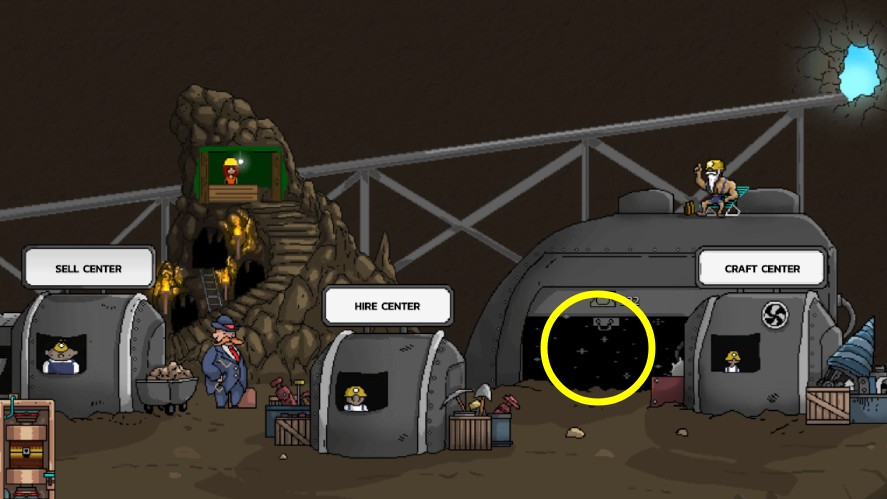
- Click the Redeem button in the bottom corner of the panel.
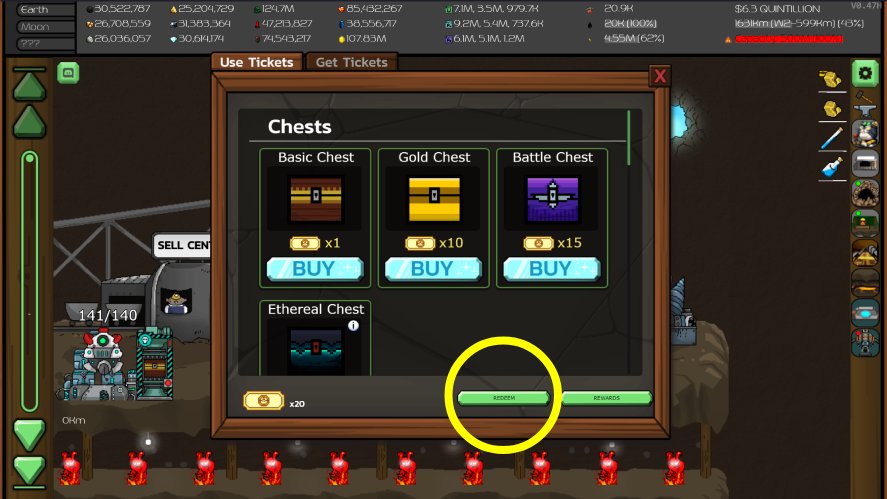
- Paste your code into the text box.
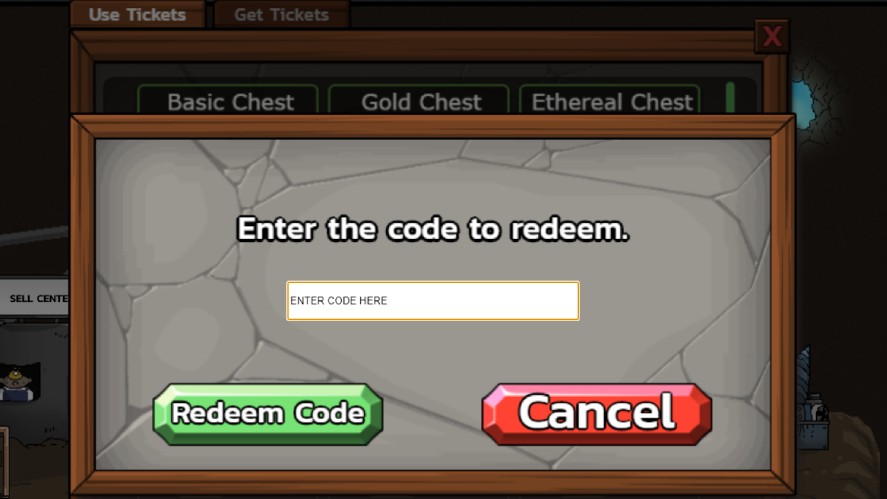
- Click the Redeem Code button to gain your rewards.
The direct link therefore saves you the step of finding or manually transcribing the code. It does not mean that the reward is automatically claimed just by opening the URL.
Android
The steps to redeem codes on Android devices are the same as above.
- Launch Mr. Mine Idle on your device and tap the Garage.
- Tap the Redeem button at the bottom.
- Paste your code and tap Redeem Code.
iOS
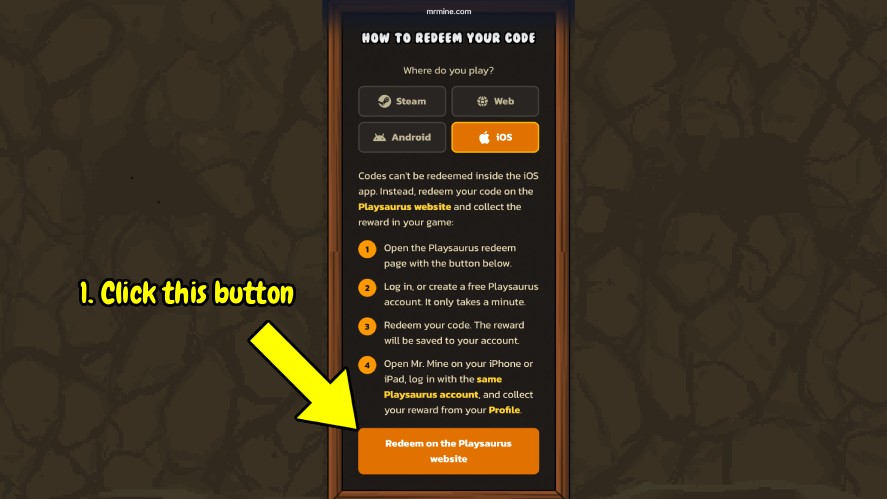
iOS handles Mr. Mine code redemption differently. Codes cannot be redeemed inside the iOS app, so the redemption link sends iPhone and iPad players to the Playsaurus website instead.
The key part of this process is your Playsaurus Account. This account connects your redemption to your Mr. Mine profile, so the reward can be saved online and then collected in the game.
Here’s how to redeem codes on iOS:
- Open the Playsaurus redemption page from the Mr. Mine redemption link.
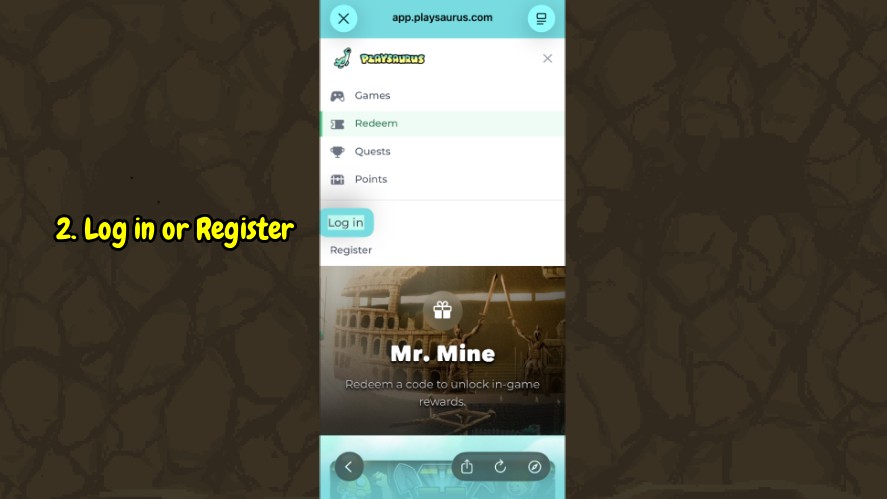
- Log in to your Playsaurus Account, or create one if you do not have an account yet.
- Redeem the code on the website. The reward is then saved to your Playsaurus Account.
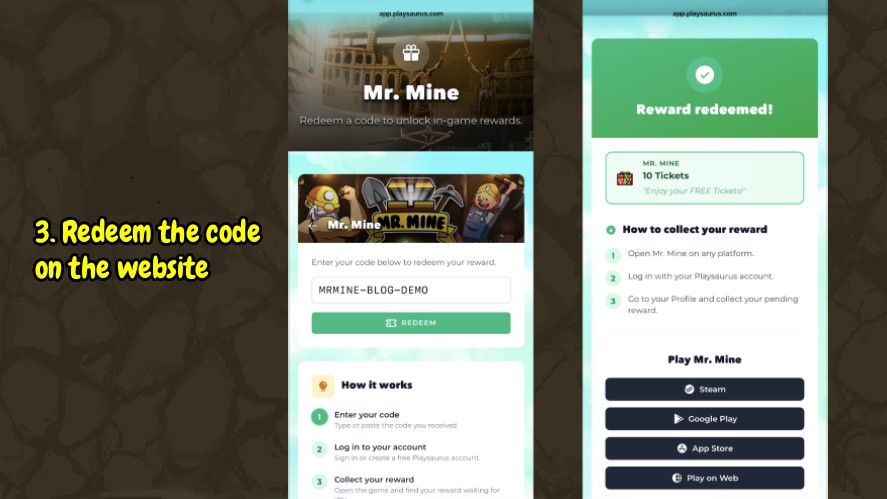
- Open Mr. Mine on your iPhone or iPad and log in with the same Playsaurus Account.
- Open your Profile and go to Rewards in one of two ways to claim your rewards:
- Main Menu → Account → Rewards
- Garage → Rewards
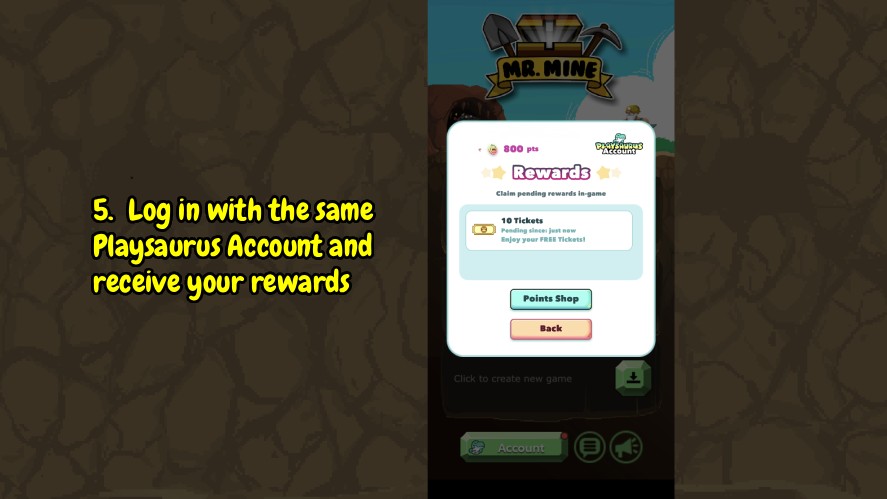
Important: Make sure you use the same Playsaurus Account on the website and in Mr. Mine. The account is what connects the redeemed reward to your game.
Step 4: Complete the Redemption
Once you submit a valid code, the result depends on the platform you are using.
After the code is accepted, the associated reward is added to the game. The exact reward depends on the code, so it could be tickets, a chest, a buff, or another promotional item.
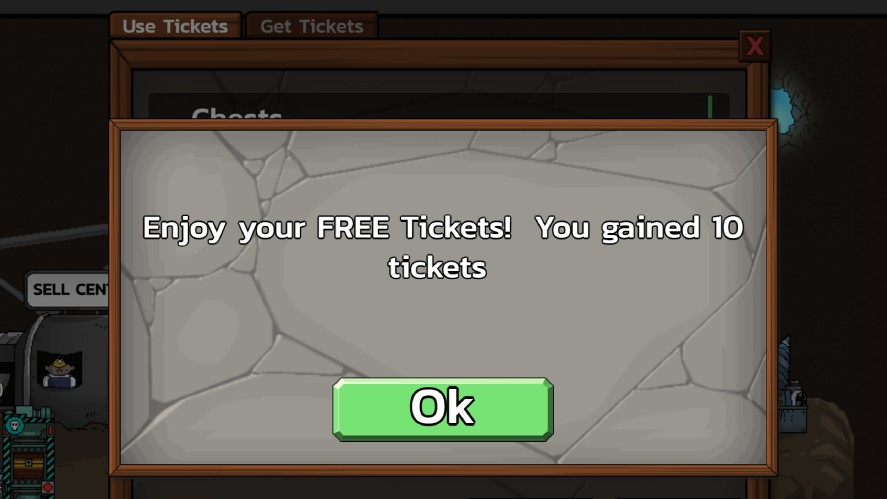
For iOS, the reward is first saved to your Playsaurus Account rather than being redeemed directly inside the game. After you sign in to Mr. Mine with that same account, you can collect the reward from your Profile.
Do not expect every code to produce the same reward. The item you receive is determined by the individual promotional code.
Step 5: Verify the Reward in the Game
After redeeming the code, check the relevant part of the game for your reward. Depending on the code, this could mean checking your ticket balance, inventory, chests, or an active buff.
If the reward does not appear immediately:
- Wait briefly and check again.
- Close and reopen the relevant game menu.
- Restart Mr. Mine once.
- Make sure you are using the same account or save associated with the redemption.
- Confirm that the code has not already been redeemed.
Direct-Link Redemption Video/GIF Tutorial
Method 2: Enter a Mr. Mine Code Manually in the Game
If you only received the code itself, you can redeem it directly from the game.
This is also an old-school method if a redemption link does not open correctly or you prefer to enter the code yourself.
Step 1: Launch Mr. Mine
Open Mr. Mine on your device and make sure you have the correct save loaded before continuing.
Step 2: Open the Garage
From the main game screen, open the Garage located below the buff miner.
Step 3: Open the Ticket Shop Tab
In the Ticket Shop, select Use Tickets. This is the tab where the code redemption option is available.
Step 4: Select Redeem
After opening Use Tickets, select Redeem to open the code entry field.
Step 5: Paste or Type the Code
Enter the Mr. Mine code exactly as it was provided.
For the best results:
- Copy and paste the code when possible to avoid typing mistakes.
- Do not add spaces before or after the code.
- Keep any hyphens or other symbols included in the original code.
- Check similar-looking characters, such as 0 and O, or 1, I, and L.
- Keep the original capitalization.
If you received a direct redemption link, you can also use the Copy button on the redemption page to copy the code before returning to the game.
Step 6: Submit the Code and Collect the Reward
After entering the code, click the Redeem Code button.
If the code is accepted, the associated reward is granted to your game. The reward varies by code and may include tickets, chests, buffs, or another promotional item.
Direct Redemption Link vs. Manual Code Entry
Both methods redeem a Mr. Mine promotional code, but they start with different things.
| Method | How it Works |
|---|---|
| Direct Redemption Link | The code is already included in an official mrmine.com/redeem?code= URL. Open the link and follow the instructions for your platform. |
| Manual Code Entry | You receive the code as text and enter it yourself through Mr. Mine’s redemption interface. |
A direct link is usually the easiest option because you do not have to type the code yourself. The code is included after ?code= in the URL, and the redemption page displays it for you.
If the direct link does not complete the redemption, you can use the Copy button on the redemption page to copy the displayed code and then try the manual method.
Keep in mind that each promotional code has its own rules. Some codes have expiration dates or usage limits, while others may only be redeemable once per player.
For example, previous Mr. Mine codes have been published with limits such as 500 or 1,000 total uses, as well as 24-hour expiration windows.
Why Is My Mr. Mine Code Not Working?
A code can fail for several reasons. Here are the most common issues and how to fix them.
The Code Was Entered Incorrectly
A single incorrect character can make a code fail. Copy and paste the code whenever possible instead of typing it manually.
Check that:
- There are no spaces before or after the code.
- Hyphens and other symbols are included.
- The capitalization matches the original code.
- Similar-looking characters, such as 0 and O or 1, I, and L, have not been mixed up.
If you received a redemption link, use the Copy button on the official redemption page to avoid retyping the code.
The Code Has Expired
Mr. Mine promotional codes are not necessarily permanent. Previous official code lists have included codes that expired after a specific date or were available for only a limited period.
If you found a code in an old article, social post, or community discussion, it may no longer be active. Check the original announcement or the latest official code information before trying it.
The Code Has Already Been Redeemed
Some codes are intended for one-time use per player. If you have already claimed a particular code, trying to redeem it again may not provide another reward.
The Redemption Limit Has Been Reached
Some promotional codes have a maximum number of uses. Once that limit is reached, the code may stop working even if its listed expiration date has not passed.
The Link Opens but Nothing Happens
If you open a redemption link but cannot continue, try these checks:
- Make sure you opened the complete URL, including everything after ?code=.
- Check that the address uses the official mrmine.com domain.
- If your browser asks for permission to open Mr. Mine, allow it if you want to launch the game.
- Try opening the link in another supported browser.
- Make sure Mr. Mine is installed and up to date if you are using a supported app version.
- Use the Copy button on the redemption page to copy the code, then try redeeming it manually in the game.
The Game Is Out of Date
If the code should be valid but the redemption interface is not working as expected, check whether Mr. Mine has an available update.
Install the latest version, reopen the game, and try the redemption process again. An outdated game can also make the interface differ from the current instructions.
The Reward Does Not Appear
If the code was accepted but you cannot immediately find the reward, give the game a moment to update.
Then, close and reopen the relevant game menu. Also, check the balance, inventory, chest section, or active buffs that could contain the reward. And lastly, restart Mr. Mine once if necessary.
The Platform Does Not Support the Redemption Method
The redemption process depends on where you play Mr. Mine.
Steam, Web, and Android use the in-game redemption flow through the Garage. iOS uses the Playsaurus Account redemption process instead because codes are not entered directly into the iOS app.
If a direct link does not work on your platform, use the platform-specific instructions in the redemption section above rather than trying an unsupported method.
The Code Came From an Unofficial Source
Be careful with codes shared on unofficial websites, videos, forums, or social posts. A code may be expired, mistyped, or accompanied by an unsafe link.
When possible, verify codes through official Mr. Mine channels and use the official mrmine.com redemption domain.
You should never need to download files, install extensions, complete suspicious surveys, or provide passwords to obtain a code.
Where to Find Official Mr. Mine Codes and Redemption Links
The safest way to find new Mr. Mine codes is to follow the game’s official channels.
Codes can be limited-time promotions, so older codes found elsewhere may already be expired or have reached their usage limit.
Here are the best places to check:
- Mr. Mine Blog
- Official Mr. Mine Discord
- Official Mr. Mine social accounts
- Steam announcements
- In-game announcements and events
Be cautious with codes posted on unofficial Reddit threads or random code lists. These sources can contain expired or incorrect codes, and some may link to unsafe websites.
When possible, verify the code through an official Mr. Mine source and use the official mrmine.com redemption page.
Frequently Asked Questions
A Mr. Mine redemption link uses the official mrmine.com domain. For example, https://mrmine.com/redeem?code=ABC-123 contains ABC-123 as the code parameter.
Usually no. Some Mr. Mine codes have been limited to one use per player, while others have had a maximum number of total uses or a specific expiration period.
Yes, if you already have the code, you can skip the redemption link and enter it manually through the game’s redemption interface.
Mr. Mine accepts codes entered with both uppercase and lowercase letters, but it is not clear whether changing the capitalization makes the code itself different. To avoid any issues, enter the code exactly as it was provided, including its capitalization, numbers, hyphens, and other symbols.
Yes, Mr. Mine redemption codes do expire and often have short expiration periods, including codes that were available for only 24 hours. Others have had a limited number of uses instead.
The reward depends on the individual code. Past Mr. Mine promotions have included Tickets, Golden Chests, Ethereal Chests, timelapses, buffs, and depth bonuses.
Yes, but the process differs between Android and iOS. On Android, open the Garage, select Use Tickets, choose Redeem, and enter the code. On iOS, redeem the code using a Playsaurus Account, then sign into Mr. Mine with that same account and collect the reward from your Profile.
No active reward should be assumed from ABC-123. It is used in this guide only as a placeholder to demonstrate how a Mr. Mine redemption URL is structured.
Redeem Your Code and Return to the Mine
Redeeming a Mr. Mine code is straightforward once you know which method to use.
If you receive an official mrmine.com/redeem?code= link, use the direct-link method first. If you only have the code itself, open the Garage and enter it manually on Steam, Web, or Android.
iOS players should use the Playsaurus Account method described above.
Always copy codes exactly as published and redeem them promptly, since promotions can expire or reach their usage limits. For legitimate codes and announcements, follow the official Mr. Mine channels rather than other sources.
Ready to start mining? Play Mr. Mine on the official website!